Turn Your Resume into a Professional Portfolio Website
Transform your resume into a professional online portfolio. Showcase your skills, projects, education, and experience with a website you can share with recruiters. No coding required.
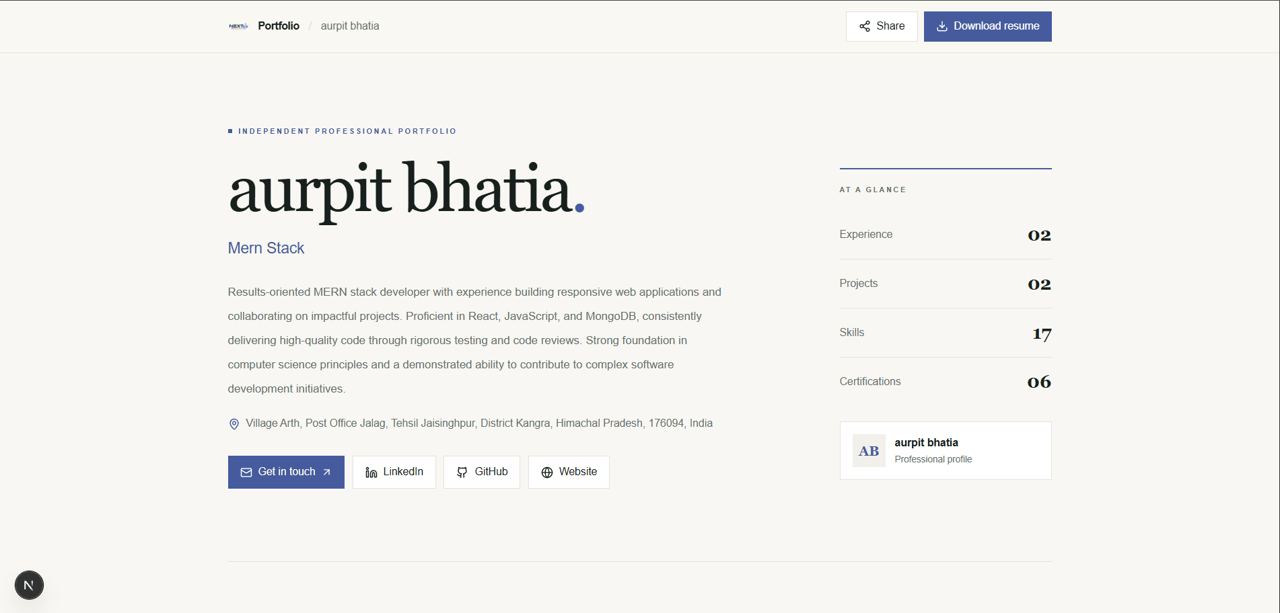
Understand the Difference
Why Pair a Resume with an Online Portfolio?
Your resume summarizes your qualifications. An online portfolio gives recruiters more ways to explore your projects and practical skills.
| Feature | Resume PDF | NextCV Portfolio |
|---|---|---|
| Format | Downloadable PDF document | Responsive online website |
| Project Showcase | Concise descriptions and bullet points | Dedicated project sections and supporting links |
| Sharing | Attach to job applications | Share through LinkedIn, GitHub, and email |
| Hosting | Stored as a document | Published online through NextCV |
| Best Use | Formal job applications and ATS submissions | Demonstrating projects and professional capabilities |
Simple Portfolio Creation
How to Turn Your Resume into a Portfolio Website
Create a professional portfolio in a few simple steps. Reuse your resume information, review your details, and publish a website you can share with recruiters.
Create Your Resume
Add your professional summary, education, skills, work experience, and projects to your NextCV resume.
Unlock Portfolio Access
Choose the Elite plan for ₹399 as a one-time payment to access portfolio creation.
Build Your Portfolio
Create your portfolio using your existing resume information without entering the same details again.
Review Your Details
Review your profile, skills, experience, and projects. Check your information and contact details before publishing.
Share Your Website
Publish your portfolio and share its public link with recruiters or add it to your LinkedIn profile, GitHub bio, and job applications.
Portfolio Studio
Explore the Portfolio Creation Experience
See how your resume information can become a professional portfolio that presents your work clearly.
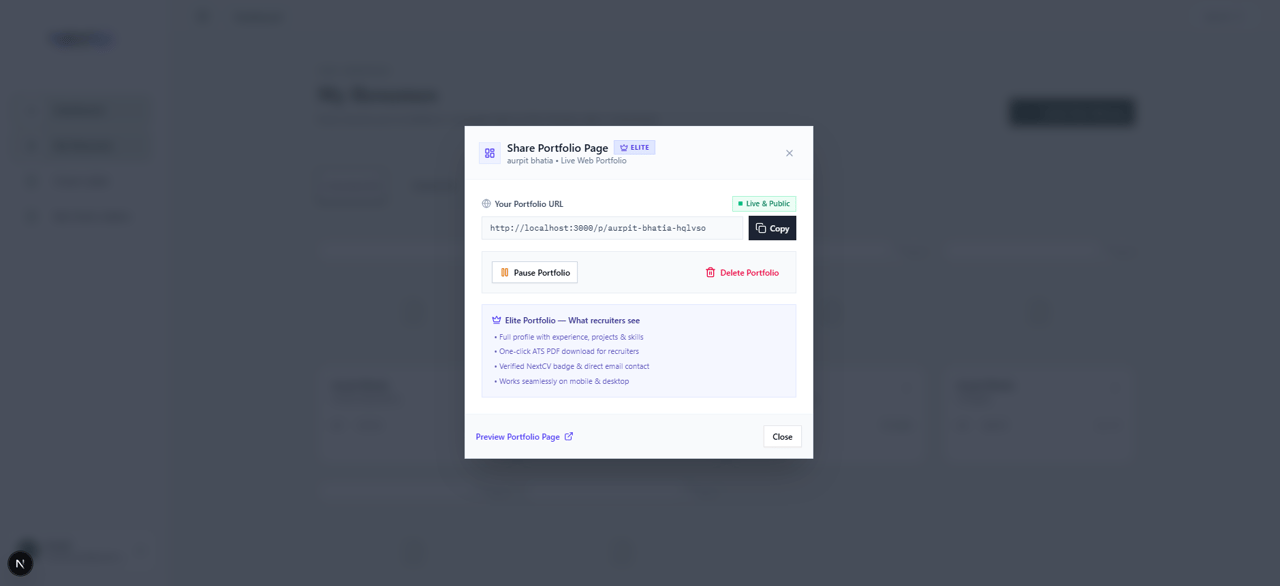
Reuse Your Resume Information
Present your project titles, skills, and descriptions without having to enter the same information again.
Review Your Portfolio
Check your profile, experience, projects, and contact details so your published portfolio presents accurate information.
Who It's For
Who Benefits Most from an Online Portfolio?
A portfolio can help you demonstrate practical skills and showcase work that may not fit into a traditional resume.
Software & Web Developers
Showcase your GitHub repositories, technical skills, frameworks, and software projects in one professional online portfolio.
Students & Freshers
Present academic projects, internships, certifications, and technical skills when applying for internships and entry-level jobs.
Career Switchers
Demonstrate your transferable skills and newly acquired expertise through relevant projects and professional experience.
Frequently Asked Questions
Learn how to create, publish, and share your portfolio with NextCV.
What is a resume-to-portfolio builder?+
A resume-to-portfolio builder turns the information in your resume, including your professional summary, skills, education, work experience, and projects, into a personal portfolio website that you can share online.
How do I turn my resume into a portfolio website?+
Create your resume with NextCV, choose the Elite plan to unlock portfolio creation, and generate your portfolio using your existing resume information. Review your details before publishing your portfolio and sharing its link.
Can I build a portfolio without coding?+
Yes. You do not need to write HTML, CSS, or JavaScript or configure hosting. NextCV helps you create a responsive portfolio website without requiring coding knowledge.
What information appears in my portfolio?+
Your portfolio can showcase your profile, professional summary, skills, education, work experience, and projects. Review your published portfolio to ensure the information displayed is accurate and appropriate to share.
Can I edit my portfolio after creating it?+
You can manage your portfolio using the available portfolio controls. Review the available editing options in your dashboard before making changes, and keep your portfolio information up to date.
Can I share my portfolio with recruiters?+
Yes. Your published portfolio has a shareable public link, such as nextcv.in/p/your-slug. Include it in job applications, email introductions, your LinkedIn profile, or your GitHub bio.
Is portfolio creation free?+
Portfolio creation is included with the NextCV Elite plan, priced at ₹399 as a one-time payment. It is not included in the Basic plan at ₹49 or the Standard plan at ₹99. Check the pricing page for the latest plan details.
Can my portfolio appear in Google Search?+
A published portfolio has a public URL, but that does not guarantee that Google will index or rank it. Search visibility depends on factors such as crawlability, indexing eligibility, content quality, and competition.
Is an online portfolio better than a PDF resume?+
They serve different purposes. A PDF resume is useful for formal job applications and applicant tracking systems, while an online portfolio provides more room to showcase projects, skills, and supporting links. Using both can help you present your qualifications more effectively.
Who should create an online portfolio?+
Students, freshers, software developers, designers, and professionals changing careers can use an online portfolio to showcase projects, practical skills, and relevant experience to potential employers.
Connected Product Suite
More tools to advance your career
Explore other features designed to help you land interviews faster.
AI Resume Builder
Build an ATS-ready resume with AI bullet optimization and clean typography.
AI Cover Letter Generator
Generate tailored cover letters tailored to your job description and resume.
Shareable Resume Link
Publish your resume online with privacy controls and instant recruiter access.
Showcase Your Work to Recruiters
Turn your resume into a professional online portfolio. Showcase your skills, projects, and experience with a shareable website. Included with the NextCV Elite plan for ₹399 as a one-time payment.